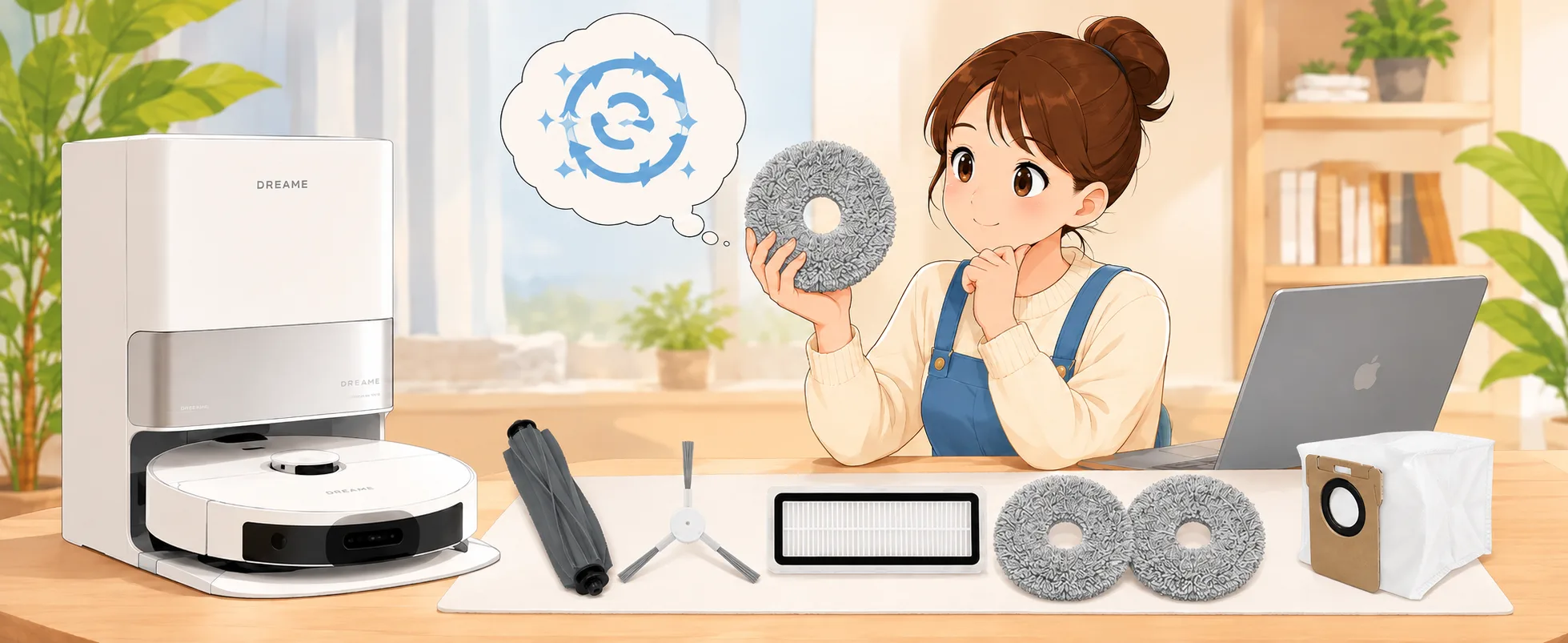
The right Dreame L10s Ultra accessories help your robot vacuum maintain effective cleaning performance. However, everyday use can wear down the main brush, side brushes, mop pads, filter, and dust bag.
How can you tell when these parts need replacing? Which accessories fit your robot? And what should you check when cleaning performance drops?
This guide explains how to identify your model, check accessory compatibility, recognize worn parts, troubleshoot common problems, and choose suitable replacements.
1. How to Identify Your Dreame L10s Ultra Model
Several Dreame L10 series robots have similar names. Therefore, always confirm your exact model before purchasing replacement accessories.
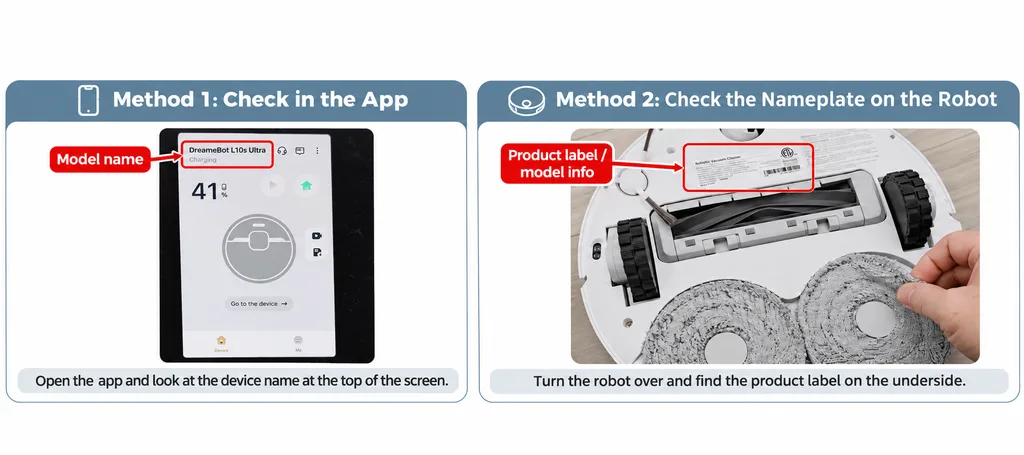
You can identify your robot in two ways:
- Check the Dreame App: Open the app and look for the model name in your device information.
- Check the robot’s nameplate: Turn off the robot, carefully turn it over, and locate the product label on the underside.
Although different models may look similar, they can use different accessories. For this reason, never rely on appearance alone.
2. Dreame L10s Ultra Accessories Compatibility Guide
Before buying Dreame L10s Ultra replacement parts, compare their dimensions, connectors, and mounting structures with your original accessories.
Even small differences can affect installation. Therefore, use the following checklist when selecting replacement parts.
| Accessory | What to Check |
|---|---|
| Main Brush | Compare the length and connectors at both ends. Rubber, bristle, and cutting brush designs may fit the same mounting system when their dimensions and connectors match. |
| Side Brush | Check the center mounting hole and attachment method. |
| Mop Pads | Compare the diameter and mounting structure. |
| Filter | Check the dimensions, housing shape, and sealing edges. |
| Dust Bag | Compare the connector, mounting slot, and sealing structure. |
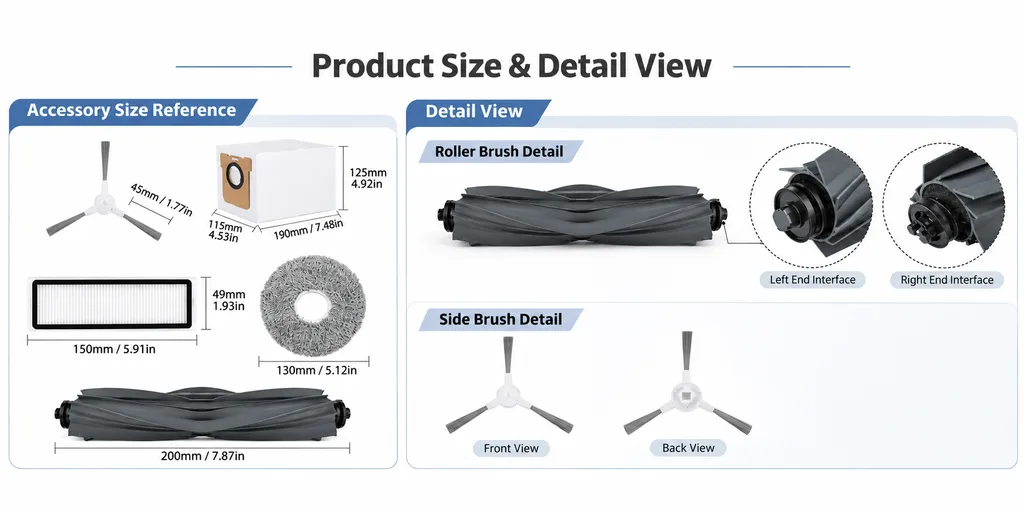
Similar Dreame Models and Accessory Differences
Some Dreame models share certain accessories. However, others require different brushes, filters, or dust bags.
The table below compares these models with the Dreame L10s Ultra.
| Similar Model | Accessory Differences Compared with L10s Ultra |
|---|---|
| Dreame L10 Ultra | The main brush, side brushes, filter, dust bag, and mop pads are interchangeable. |
| Dreame L10s Ultra Gen 2 | Uses a different filter and dust bag. |
| Dreame L10s Ultra Gen 3 | Uses different side brushes, filter, and dust bag. |
| Dreame L10s Pro Ultra Heat | Uses a different filter and dust bag. |
| Dreame L10s Plus | Uses a different dust bag. |
| Dreame L10s Pro | Does not use a dust bag. The main brush, side brushes, filter, and mop pads are interchangeable. |
Important: Sharing one accessory does not mean two robot models use identical replacement parts across every category.
Before ordering, check the seller’s compatibility list and compare the original accessory with the replacement product.
If you are unsure, contact the seller and confirm your exact robot model.
3. When Should You Replace Dreame L10s Ultra Accessories?
Regular inspections help you identify worn parts before they affect your robot’s cleaning performance.
Instead of following a fixed schedule alone, check each accessory for visible wear, damage, or dirt buildup.
| Accessory | Signs of Wear | What to Do |
|---|---|---|
| Main Brush | Tangled hair, worn rubber strips, damaged ends | Remove debris and replace damaged brushes. |
| Side Brushes | Bent bristles, broken strands, irregular rotation | Check the installation and replace worn brushes. |
| Mop Pads | Thin fabric, damage, stubborn stains | Wash regularly and replace worn pads. |
| Filter | Heavy dust buildup, damaged material, blockages | Clean as instructed or replace when necessary. |
| Dust Bag | Full bag, tears, damaged seal | Install a new compatible dust bag. |
For example, tangled hair around the main brush may affect rotation. However, cleaning the brush can often resolve the problem without replacing it.
On the other hand, damaged rubber strips or broken brush connectors usually require replacement.
Video: How to Replace Dreame L10s Ultra Accessories
Watch the following tutorial for a visual guide to accessory replacement and maintenance.
Before following the steps, confirm that the video covers your robot model and the accessories you plan to replace.
4. Common Dreame L10s Ultra Cleaning Problems
If your robot leaves dust behind or struggles to mop effectively, start by identifying the problem.
Then inspect the relevant components before buying new accessories.
| Common Problem | Parts to Check First |
|---|---|
| Dust remains on the floor | Main brush, filter, and airflow path |
| Poor corner cleaning | Side brushes |
| Stains remain after mopping | Mop pads and mopping system |
| Base station cannot collect dust properly | Dust bag, connector, and collection channel |
| Robot makes unusual noises | Main brush, side brushes, and rotating components |
For instance, a blocked airflow path may reduce suction performance. Similarly, tangled hair can prevent the main brush from rotating smoothly.
Therefore, remove any debris and check the installation before replacing accessories.
If the problem continues, inspect the affected components for damage.
5. How to Maintain Dreame L10s Ultra Accessories
Regular maintenance can help extend the useful life of your replacement parts.
Follow these practical tips:
- Main Brush: Remove tangled hair, threads, and debris from the brush and both end caps. Also, check for visible damage.
- Side Brushes: Remove trapped hair and inspect the bristles for bending or breakage.
- Mop Pads: Wash the mop pads regularly and allow them to dry completely before reuse.
- Filter: Follow the manufacturer’s cleaning instructions. Only wash the filter if its instructions explicitly permit water washing. Let it dry completely before reinstalling.
- Dust Bag: Check the fill level and sealing condition. Replace the bag when it becomes full, damaged, or starts leaking dust.
After cleaning or replacing an accessory, make sure you install it correctly.
In addition, inspect your accessories more frequently if you have pets, long hair, or heavy daily dust accumulation.
6. How to Choose the Right Replacement Accessories
When shopping for Dreame L10s Ultra accessories, focus on three important factors.
1. Confirm Your Exact Robot Model
Check the full model name in the Dreame App or on the robot’s nameplate. Do not rely only on the L10 series name.
2. Compare Accessory Dimensions and Connectors
Check the size, mounting structure, and connection design. Even similar-looking parts may not fit correctly.
3. Review Package Contents
Check how many accessories the package includes and which robot models the seller lists as compatible.
If several accessories need replacing, a complete replacement kit may offer better value and convenience.
However, when only one part needs attention, buying an individual replacement may be more practical.
Before purchasing, always review the product description and compatibility information.
7. Frequently Asked Questions
Are Dreame L10s Ultra and L10 Ultra accessories interchangeable?
According to the compatibility information in this guide, these models share the main brush, side brushes, filter, dust bag, and mop pads.
However, you should check other accessories individually before purchasing.
Can I use Dreame L10s Ultra Gen 2 accessories with the L10s Ultra?
Some accessories are interchangeable, but the filter and dust bag differ.
Therefore, confirm the compatibility of each part before ordering.
Can I wash and reuse Dreame L10s Ultra mop pads?
Yes. Wash the mop pads according to their care instructions and allow them to dry completely.
However, replace the pads if the fabric becomes damaged, worn, or less effective at cleaning.
How do I know if my Dreame L10s Ultra filter needs replacing?
Check for damaged filter material, persistent dust buildup, or blocked airflow.
First, clean the filter according to its instructions. If the filter remains damaged or clogged, consider replacing it.
Should I buy individual accessories or a complete kit?
If only one component needs replacing, an individual accessory is usually the more practical choice.
On the other hand, a complete kit can offer better value when you need several replacement parts.
8. Shop Dreame L10s Ultra Replacement Accessories
Regularly inspecting, cleaning, and replacing worn accessories can help maintain your robot’s everyday cleaning performance.
Whether you need a main brush, side brushes, mop pads, filters, or dust bags, choosing compatible replacement parts is essential.
Looking for Dreame L10s Ultra accessories?
Explore replacement options below.
AliExpress
Shop Dreame L10s Ultra Accessories on AliExpress
Amazon India
Shop Dreame L10s Ultra Accessories on Amazon India
Before placing your order, check the product description, package contents, and compatible model list.
Compatibility Disclaimer: This guide covers independently supplied compatible replacement parts, not original Dreame accessories. Dreame and related model names are trademarks of their respective owners. Always verify your exact robot model and the replacement product’s compatibility information before purchasing.